

Parts
A Part is the shared catalog record that identifies a component. It holds product information such as its name, internal SKU, manufacturer, manufacturer part number, category, and supplier listings. The same Part can be used by Inventory, Project BOMs, Builds, and Purchasing.
A Part is not the physical stock itself. Stock is received into batches and held at exact locations. A Part can exist in the catalog with no stock, and the Parts list shows its stock totals when stock is available.
How Parts connect to other modules
- Inventory records received stock, its stock batch, supplier listing, and exact location. See the Inventory guide or the Stocked Parts guide to work with holdings and locations.
- Projects use Parts as the items in a project BOM. See Project BOMs.
- Project Builds reserve available quantities of Parts, then pick and consume specific stock. See Project Builds.
- Purchasing can connect requests and Purchase List items to a Part and supplier listing. Continue with Purchasing.
- Categories organize the catalog. Manage them in App Settings → Categories.
- Supplier listings connect a Part to a supplier's product number. Manage supplier records in App Settings → Suppliers.
Parts list
The Parts table has one row per catalog Part. It shows:
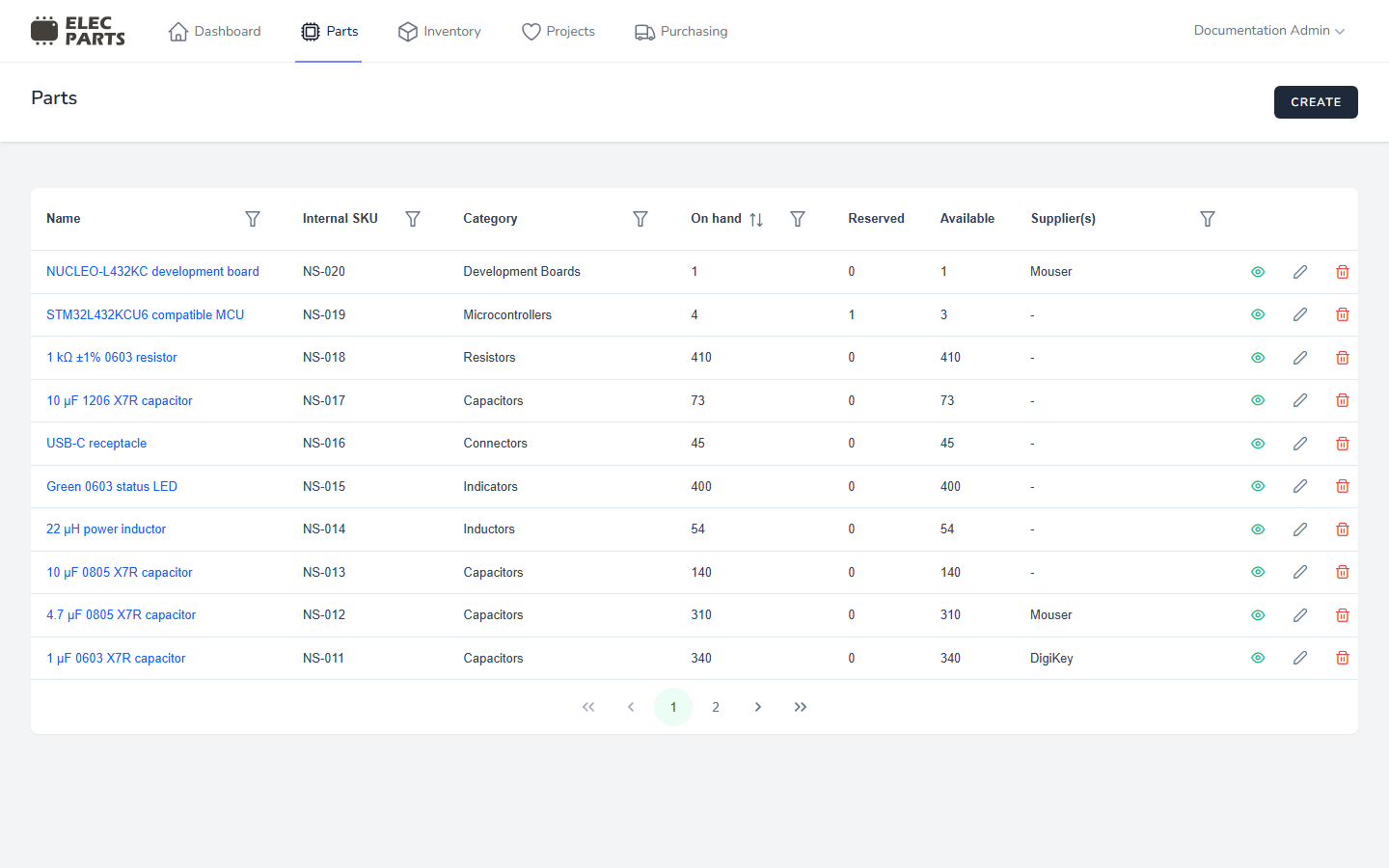
| Column | What it shows |
|---|---|
| Name | Part name; select it to open the details drawer. |
| Internal SKU | Your lab's identifier for the Part. |
| MPN | Manufacturer part number. Select it to copy; long values are truncated and available on hover. |
| Category | The assigned category. |
| On hand | Total quantity currently held across locations and stock batches. |
| Reserved | Quantity committed to active project builds, including Matching reservations that are not yet assigned to a specific holding. |
| Available | On hand minus Reserved; the quantity that can be used for other work. |
| Supplier(s) | Suppliers connected through this Part's supplier listings. |
| Actions | Open details, edit, or delete, depending on your permissions. |
The table includes Parts with no stock; their On hand, Reserved, and Available values are zero. These stock totals are calculated from inventory holdings and active build reservations. They use the same meanings shown in Project Builds.
Use a column's filter menu to narrow the list:
- Name searches for matching text.
- Internal SKU searches for matching SKU text.
- MPN searches for matching manufacturer part number text, without regard to case.
- Category and Supplier(s) let you choose one or more values.
- On hand accepts a number and comparison: equals, less than, less than or equal to, greater than, or greater than or equal to.
Reserved and Available are displayed totals, not table filters. The table shows ten Parts per page. Select a Part name or the show action to see its catalog information, stock by location, and build usage.
Create and manage Parts
- Create or edit a Part to add catalog identity, category, a reference link, or a datasheet.
- Review Part details and stock to inspect stock batches, build reservations, or change stock from a location.