

Needs Purchasing
Needs Purchasing is the queue for open demand. Requests from Project Builds appear alongside manual requests. From here, you can filter the queue, inspect a request, and add sourceable demand to a Purchase List.
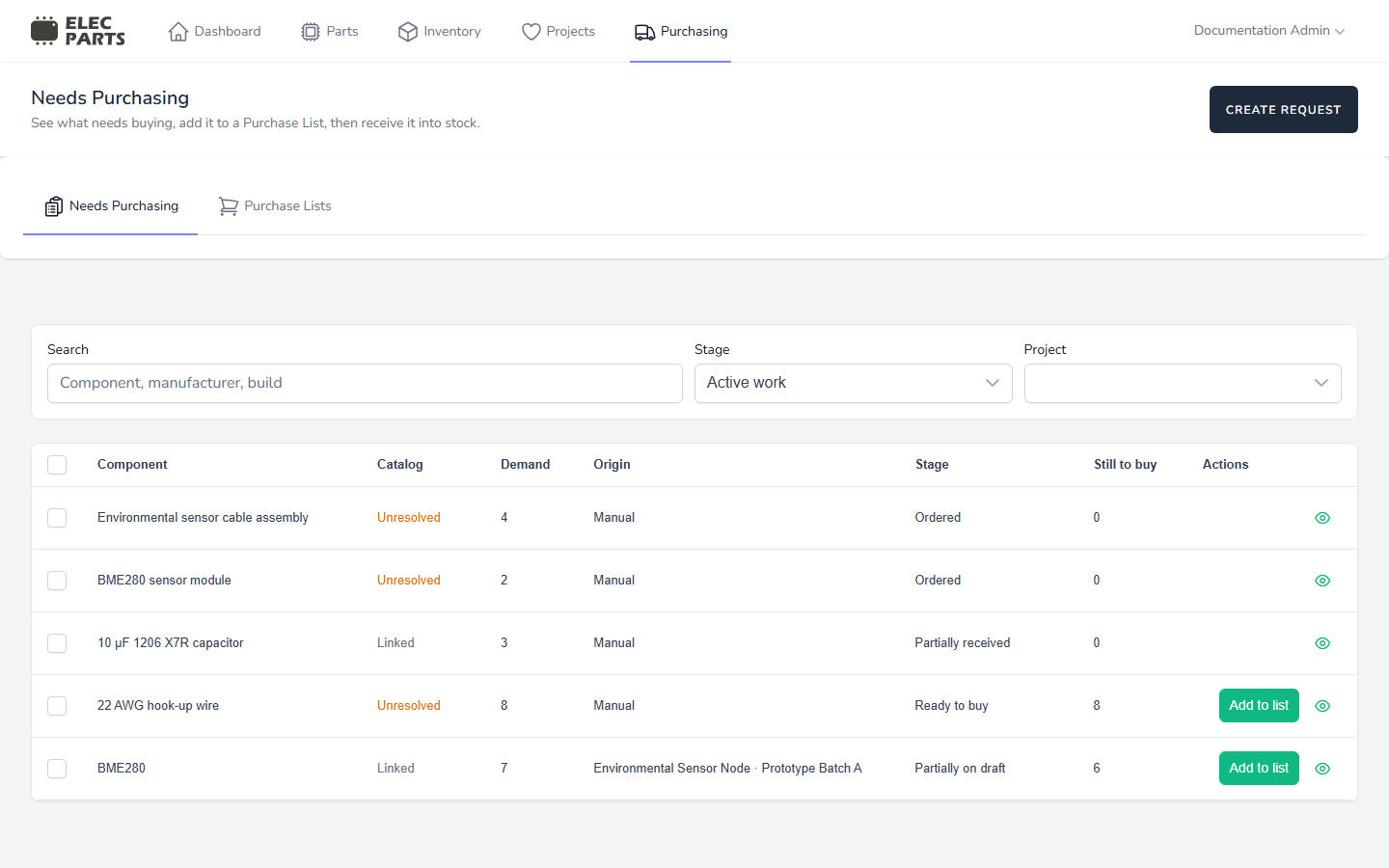
Queue tabs and filters
Use Needs Purchasing for demand and Purchase Lists to review supplier order plans.
- Search matches component name and description, manufacturer, manufacturer part number, and a linked Part's internal SKU. Use Project to narrow the queue to requests originating from builds in that project.
- Stage defaults to Active work. This shows open rows whose grouped demand is not fully received; partially received rows remain. A grouped row can include a fully received request when another request for the same Part still has active demand. All open demand also includes rows whose grouped demand is fully received. The other stage filters are Ready to buy, Partially on draft, On draft, Partially ordered, Ordered, Partially received, Received, and Cancelled.
- Project lists projects with build-originated requests. Manual requests are not tied to a project.
The queue paginates 25 grouped rows at a time. A linked catalog Part can group requests that refer to that same Part, so Demand and progress quantities may summarize more than one request.
Read a queue row
| Column | What it shows |
|---|---|
| Component | The Part name or the component name entered on an unlinked request. |
| Catalog | Linked when the request identifies a catalog Part; Unresolved when it keeps component details without a Part link. Matching text does not create a link. |
| Demand | The total requested quantity represented by the row. For a grouped Part, this adds the grouped requests together. |
| Origin | Project and build information for build demand, or the source label for a request without a build origin. |
| Stage | Progress derived from allocations to Purchase Lists and receipt quantities. |
| Still to buy | Requested quantity not yet allocated to a Purchase List. Once all demand has been allocated, this is zero even if the order has not arrived. |
Select Add to list when a row has sourceable demand to choose a supplier and Purchase List destination. Select the details action to see one underlying request; on a grouped row it opens the first sourceable request, or the row's request if none are sourceable. See Source Purchase Requests for destination choices and quantity coverage, then Purchase Lists to review the resulting order.
Progress is calculated from the grouped requests' purchasing history. Ready to buy has no active list coverage; Partially on draft and On draft describe coverage on Draft lists; Partially ordered and Ordered describe coverage on ordered lists. Receipt can move that demand to Partially received or Received. Cancelling a manual request gives it the Cancelled stage.
Where requests come from
Project Build requests are created from a build's BOM requirement. Their quantity follows the required build quantity, while preserving any greater quantity already allocated to non-cancelled Purchase Lists if the requirement decreases. The build and project identify their origin. Manage or withdraw this demand from the Project Build while that build is active; it is not an editable manual request.
Manual requests are entered from Needs Purchasing. A user can choose a catalog Part or keep a component as an unlinked identity. An unlinked request can still record a name, description, manufacturer, and manufacturer part number. Creating it does not add a Part to the catalog.
Requests with the same linked Part can appear in one queue row, including a mixture of manual and build demand. Unlinked requests remain separate because their identity has not been confirmed against the catalog.
Create a manual request
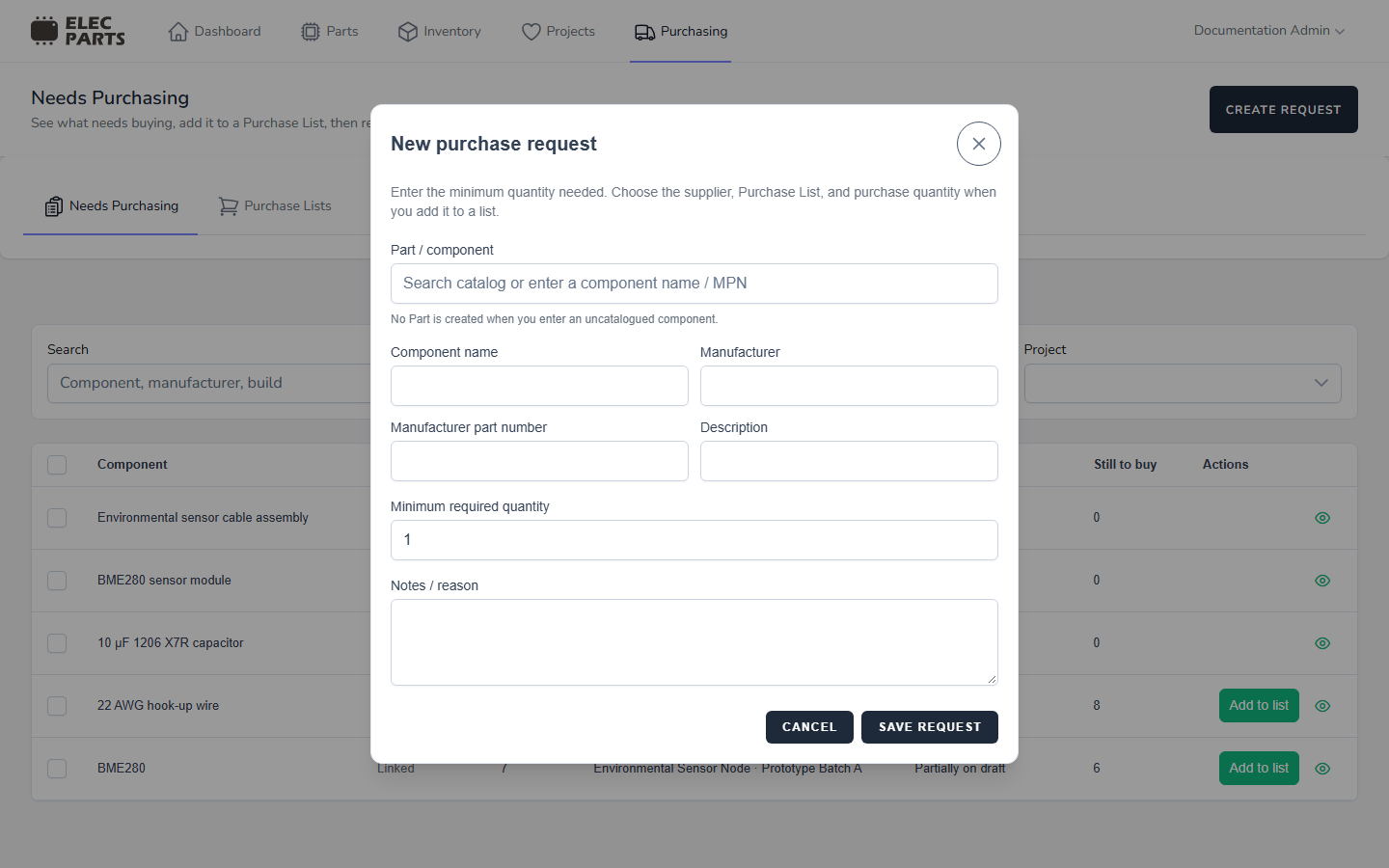
Select Create request to open the request form.
- Search Part / component by name, manufacturer, manufacturer part number, or internal SKU. Search starts after at least two characters and returns catalog Parts to choose from.
- Choose a result to link the request to that Part. Its catalog identity is used for the request.
- To keep the component unlinked, enter its name and, if known, its manufacturer, manufacturer part number, and description. The form does not create a catalog Part.
- Enter a Minimum required quantity of at least one whole unit, then add any Notes / reason.
- Select Save request. Supplier and purchase quantity are chosen later when sourcing the request.
A manual request can be edited while it is open and has no Purchase List allocations. It can be cancelled while open. Cancelling releases its Draft list allocations; Ordered list history remains recorded. A Build request's identity and quantity are managed through its Project Build.
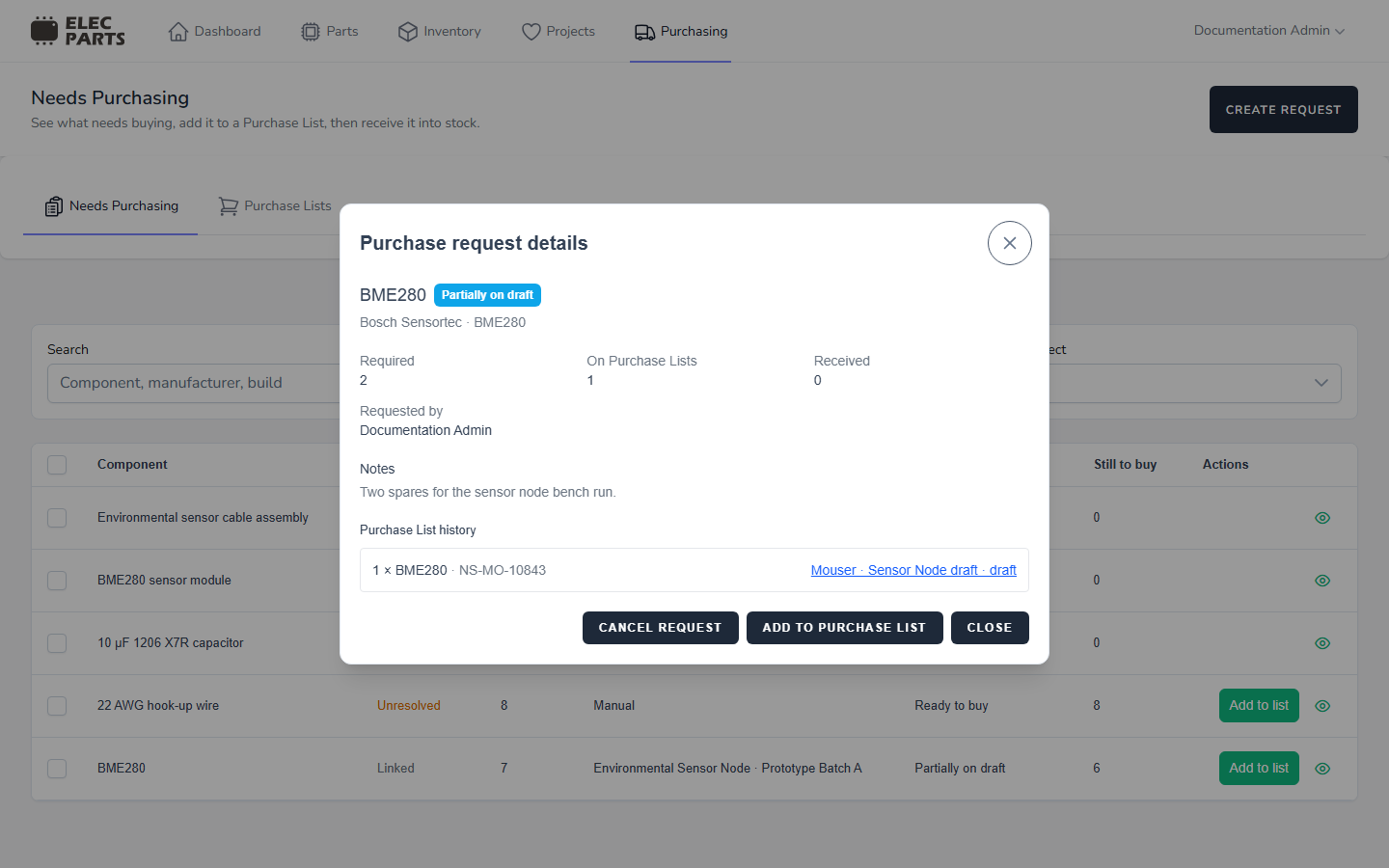
Request details
Select the details action to open Purchase request details. The dialog shows the request's current progress, required quantity, quantity on Purchase Lists, and received quantity. If it came from a build, the dialog also shows its Project, Build, BOM requirement, and designators. It includes the requester, notes, and Purchase List history with each allocated line's quantity, supplier SKU when available, list name, and list status.
Add to Purchase List is available when the request is open and still has unallocated demand, and the user can create purchasing records. Edit request appears only for editable manual requests. Cancel request appears for open manual requests.
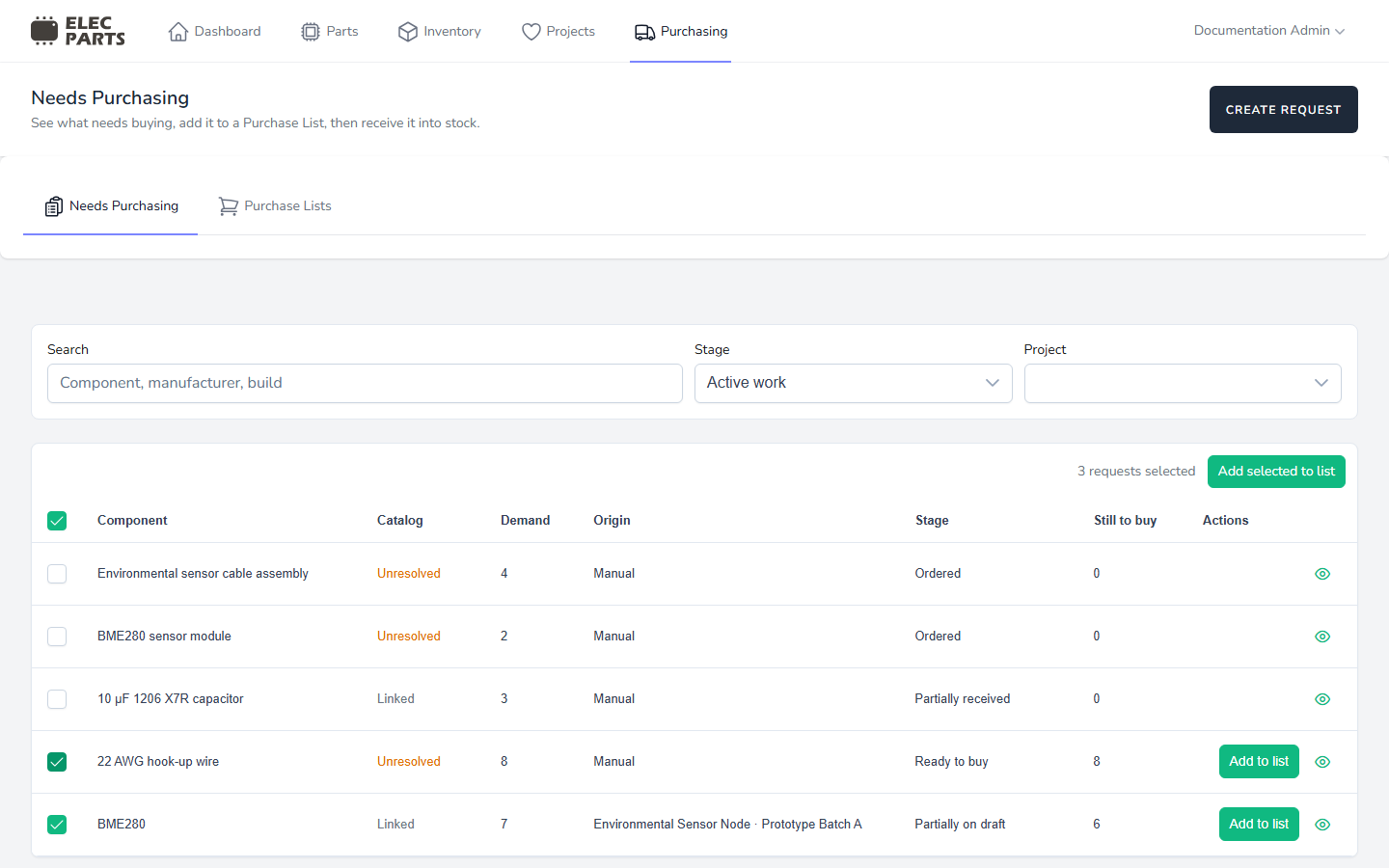
Select requests in a batch
The checkboxes select queue rows that contain at least one open request with quantity still to source. A grouped row expands to its underlying sourceable requests for the batch; requests with no remaining demand are left out. Rows with no sourceable requests cannot be selected.
The count beside Add selected to list is the number of underlying requests selected, not the number of visible rows or units. For example, selecting one row that groups a manual request and a build request can count as two requests. You can select rows with different component identities in the same batch. Batch sourcing combines requests linked to the same catalog Part onto one Purchase List line; unresolved requests remain separate lines.
Creating a manual request and adding demand to a Purchase List require purchasing creation access. Viewing Needs Purchasing requires purchasing view access; editing or cancelling a manual request requires purchasing edit access. Build requests are changed from their Project Build.